Security & Software
F-Secure Antivirus Review 2026: Is It Worth the High Cost?
F-Secure Antivirus Review 2026: Is It Worth the High Cost? F-Secure is one of the more polished antivirus suites on the market right now — but it comes with...
# F-Secure Antivirus Review 2026: Is It Worth the High Cost?
F-Secure is one of the more polished antivirus suites on the market right now — but it comes with a price tag that demands justification. It consistently earns top marks from independent testing labs like AV-TEST and AV-Comparatives, and our own hands-on testing confirmed strong real-time protection and a clean, well-designed interface. That said, a few notable gaps — no proprietary firewall, limited macOS functionality, and a higher-than-average performance footprint — keep it from being a clear-cut recommendation for everyone.
In this review, we cover everything you need to know: our testing experience, feature breakdown, pricing comparison, third-party lab results, and a straight answer on whether F-Secure is worth the money in 2026.
Pros and Cons
Pros
- Excellent detection rates across malware, phishing, ransomware, and zero-day threats
- Perfect scores in both in-house EICAR testing and major third-party lab evaluations
- F-Secure Total bundles a VPN, password manager, and identity monitoring into one plan
- Clean, intuitive interface that works well for non-technical users
- Generous 30-day free trial with no credit card required
Cons
- More expensive than competitors like TotalAV and Norton
- No proprietary firewall — relies entirely on your OS firewall
- macOS version is limited to a single scan type
- Noticeable performance slowdown on macOS systems
Quick Overview
| Feature | Details |
|---|---|
| Starting Price | $49.99/year |
| Free Trial | 30 days (no credit card required) |
| Devices Protected | 1–25 |
| Malware Scans | Manual and scheduled |
| Real-Time Protection | Yes |
| EICAR Test Results | 3/3 (Perfect Score) |
| Firewall | No (uses OS firewall) |
| Phishing Protection | Yes |
| Compatibility | Windows, macOS, Android, iOS |
| Bonus Features | VPN, password manager, identity monitoring |
| Customer Support | 24/7 live chat, phone support (business hours) |
Try F-Secure Free for 30 Days →
Our Testing Experience
We tested F-Secure Total on a MacBook running macOS Tahoe to evaluate real-world performance, ease of use, and detection capability.
Installation and Setup
The installation process was smooth and fast. All critical protection settings were enabled automatically, so there was very little manual configuration needed. The one step that required user action was installing the Browsing Protection browser extension — but this appeared clearly in the setup checklist, making it easy to find and complete.
Scan Performance
After setup, we headed to the Device Protection tab to run a scan. This is where we hit the first significant limitation: on macOS, F-Secure offers only one scan type — a Virus and spyware scan that covers the most commonly targeted files.
Our scan results:
- Scan time: approximately 1 minute
- Files scanned: 76,793
- Threats detected: 0 (pre-installed malware dummy files were not detected)
The scan was fast, but it failed to flag the malware dummy files we had placed on the system before installation. There was no full scan option available to test whether a deeper scan would have caught them.
It's worth noting that the Windows version of F-Secure includes more comprehensive scan options and performed significantly better in our previous testing. This limitation appears to be specific to the macOS build.
User Interface
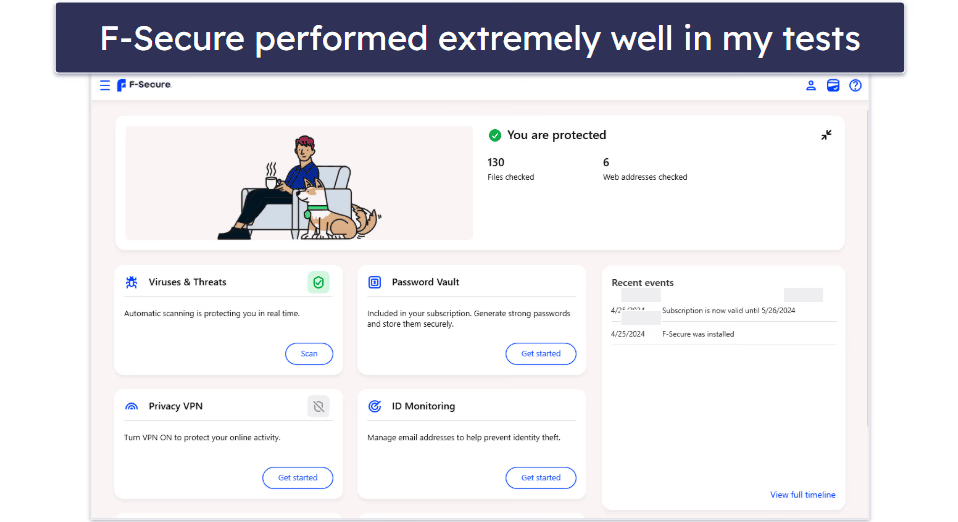
F-Secure's dashboard is clean and logically organized. Navigating between sections is straightforward, and the layout makes it easy to find what you need:
- Device Protection — run scans and view threat history
- Privacy VPN — connect to servers worldwide
- Password Vault — store and manage credentials
- Identity Monitoring — track for data breaches
The interface is well-suited to users who want solid protection without spending time learning a complicated system.
Who Should Choose F-Secure?
Best For
Windows Users F-Secure performs at its best on Windows. Multiple scan types, minimal performance impact, and perfect lab scores make it a strong choice for Windows machines.
Families The parental controls are robust and practical. Parents can filter content, block inappropriate websites and apps, and set screen time limits across compatible devices.
Gamers Gaming Mode automatically pauses scheduled scans, reduces resource usage, and prevents interruptions during gameplay — a thoughtful feature that makes a real difference.
Privacy-Conscious Users F-Secure Total includes an unlimited VPN with a kill switch, a full-featured password manager, and dark web monitoring for personal information including email addresses, Social Security numbers, and credit card details.
Not Ideal For
Budget-Conscious Users At $49.99/year for the entry plan, F-Secure is noticeably more expensive than alternatives like TotalAV ($19/year) or Norton ($29.99/year). If price is a priority, there are capable options at lower cost.
macOS Users Seeking Comprehensive Scans The macOS version's single scan type and above-average performance impact make it a less compelling choice for Mac users. It's worth exploring alternatives if you're primarily on macOS.
Pricing and Subscription Plans
F-Secure offers two main plans with flexible device coverage from 1 to 25 devices.
Plan Comparison
| Feature | Internet Security | Total |
|---|---|---|
| Starting Price | $49.99/year | $69.99/year |
| Devices Supported | 1–25 | 1–25 |
| Free Trial | 30 days | 30 days |
| Malware Protection | ✓ | ✓ |
| Phishing Protection | ✓ | ✓ |
| Real-Time Protection | ✓ | ✓ |
| Ransomware Protection | ✓ | ✓ |
| Parental Controls | ✓ | ✓ |
| Banking Protection | ✓ | ✓ |
| Gaming Mode | ✓ | ✓ |
| VPN (Unlimited) | ✗ | ✓ |
| Password Manager | ✗ | ✓ |
| Identity Monitoring | ✗ | ✓ |
| Dark Web Monitoring | ✗ | ✓ |
Price Comparison with Competitors
- TotalAV Antivirus Pro: $19.00/first year
- Norton Antivirus Plus: $29.99/first year
- McAfee Essential: $39.99/first year
- F-Secure Internet Security: $49.99/year
F-Secure is the most expensive entry on this list. The protection quality is genuinely excellent, but the price gap is real and worth considering.
Our Recommendation
For most users, F-Secure Total at $69.99/year offers better overall value than the base Internet Security plan. The extras justify the price difference:
- An unlimited VPN alone is worth $50–100/year from standalone providers
- A password manager typically costs $30–50/year separately
- Identity monitoring adds meaningful protection against data breaches
When you factor in what you'd pay for these services individually, the Total plan becomes a reasonable all-in-one package.
Security Features in Depth
Malware and Antivirus Scanning
F-Secure's scanning engine is fast and efficient. On Windows, you get multiple scan types including quick scan, full scan, USB device scan, and scheduled scans. On macOS, only the quick scan is available. Detected threats are automatically quarantined or removed, and scan schedules can be customized by frequency, day, and time.
Tip: Don't rely solely on quick scans. Run a full scan periodically on Windows to catch threats that may be hiding in less commonly accessed areas of your system.
Real-Time Protection
F-Secure uses two core technologies for continuous protection:
- Security Cloud — stores and updates threat data in the cloud using AI-powered analysis and real-time global threat feeds
- DeepGuard — monitors installed applications for suspicious behavior, blocks unauthorized system changes, and detects zero-day exploits
Together, these cover web browsing, email attachments, downloaded files, app installations, and system modifications.
Ransomware Protection
F-Secure's ransomware defense operates on multiple levels: folder monitoring to block unauthorized encryption attempts, behavioral analysis to detect ransomware-like activity patterns, and network protection to block communication with known ransomware servers.
Phishing and Web Protection
Browsing Protection blocks harmful websites in real time and guards against drive-by downloads. The browser extension (available for Chrome, Firefox, and Edge) adds ad blocking and tracking prevention on top of the core protection.
Banking Protection automatically activates on financial websites, launching a secured browser session that isolates your banking activity and clears clipboard data afterward.
Trusted Shopping alerts you to fake or untrustworthy online stores and verifies website authenticity before you enter payment details.
Firewall
F-Secure does not include its own firewall. It integrates with Windows Defender Firewall and the macOS system firewall instead. This works adequately for most users, but if you want granular firewall control or a dedicated solution, you'll need to look elsewhere.
Privacy Features (Total Plan Only)
- VPN: Unlimited bandwidth, servers in 28+ countries, no-logs policy, kill switch, automatic Wi-Fi protection
- Password Vault: Unlimited storage, strong password generator, auto-fill, secure notes, cross-device sync, biometric authentication
- Identity Monitoring: Monitors email addresses, Social Security numbers, driver's license numbers, credit card information, and bank account details for dark web exposure, with real-time breach alerts
Explore F-Secure Total Features →
Test Results and Performance
Our In-House Testing
Scan Efficiency Test
We placed malware dummy files on the system before installing F-Secure, then ran the available scan to test detection.
| Metric | Result |
|---|---|
| Scan Type | Virus and spyware scan (macOS) |
| Time | ~1 minute |
| Files Scanned | 76,793 |
| Threats Detected | 0 |
| Verdict | Failed to detect pre-installed threats |
The scan was impressively fast, but the failure to detect pre-placed dummy files is a concern — particularly given the lack of a full scan option on macOS.
EICAR Test Results
| Test | Result |
|---|---|
| Malware Detection | ✓ Pass |
| Drive-by Downloads | ✓ Pass |
| Phishing Pages | ✓ Pass |
| Overall Score | 3/3 — Perfect |
Real-time protection performed flawlessly in EICAR testing, blocking all three threat types immediately.
Third-Party Lab Results
AV-TEST (Windows, October 2025)
| Category | Score |
|---|---|
| Protection | 6/6 |
| Performance | 6/6 |
| Usability | 6/6 |
| Total | 18/18 |
AV-TEST (macOS, September 2025)
| Category | Score |
|---|---|
| Protection | 6/6 |
| Performance | 4.5/6 |
| Usability | 6/6 |
| Total | 16.5/18 |
The macOS performance score reflects a 67% average slowdown on software launch speeds, compared to a 14% industry average — a significant gap that has persisted across multiple testing cycles.
AV-Comparatives (2025)
- Real-World Protection: 99.1% (4th place)
- Malware Protection: 99.99% (2nd place, zero false positives)
- Performance: Ranked 17th out of 18 — higher system impact than most competitors
SE Labs (2021 Q4)
- Protection Accuracy: 98%
- Legitimate Accuracy: 100%
- Total Accuracy: 99%
Note: The SE Labs results are from 2021 and are the oldest data point in this review. They still reflect strong protection but should be weighted accordingly.
Platform Compatibility
F-Secure Total supports:
- Windows: Windows 10 and 11 (64-bit), minimum 2 GB RAM
- macOS: macOS 12 (Monterey) and newer, minimum 2 GB RAM
- Android: Android 10.0 or newer
- iOS: iOS 17.0 or newer
The browser extension works with Chrome, Firefox, Edge, and Safari (limited). Licenses cover any combination of supported platforms, from 1 to 25 devices. Password Vault, VPN settings, and protection preferences sync automatically across all devices.
Customer Support
F-Secure offers 24/7 live chat, phone support during business hours (Monday–Friday, 9 AM–6 PM EST), email support with a 24-hour response window, and a comprehensive knowledge base with video tutorials and a community forum.
In our testing, the live chat connected us with a knowledgeable agent in under a minute. Responses were clear, professional, and resolved our questions quickly. Support quality is genuinely one of F-Secure's stronger points.
Practical Tips
- Take advantage of the 30-day free trial before committing — no credit card required.
- Windows users will get the best experience; macOS users should weigh the performance trade-off carefully.
- If you're already paying for a standalone VPN or password manager, the Total plan likely saves you money overall.
- Schedule regular full scans on Windows rather than relying solely on quick scans.
- Enable Banking Protection before any online financial transactions for an added layer of isolation.
Final Verdict
Overall Rating: 4.5/5
| Category | Score |
|---|---|
| Protection | 5/5 |
| Performance | 4/5 |
| Features | 5/5 |
| Ease of Use | 4.5/5 |
| Value | 3.5/5 |
| Support | 4.5/5 |
F-Secure delivers genuinely excellent protection. The Windows version earns perfect scores from independent labs, the feature set in the Total plan is comprehensive and well-integrated, and the support experience is better than most competitors. For users who prioritize protection quality above all else and aren't deterred by the price, it's a strong choice.
The caveats are real, though. The macOS version has meaningful limitations, the price is higher than many comparable products, and the absence of a proprietary firewall is a gap at this price point. Budget-conscious users and Mac-primary users should compare carefully before committing.
Try F-Secure Risk-Free for 30 Days →
Frequently Asked Questions
Is F-Secure worth the price compared to cheaper alternatives? For Windows users who want top-tier protection and don't mind paying a premium, yes. F-Secure's detection rates are among the best in the industry, and the Total plan bundles several services that would cost more if purchased separately. If budget is a priority, TotalAV and Norton offer solid protection at significantly lower prices.
Does F-Secure work well on Mac? It provides good real-time protection on macOS, but the experience is more limited than on Windows. There's only one scan type available, and independent testing shows a noticeably higher performance impact on Mac systems compared to the industry average. Mac users should consider this before purchasing.
Does F-Secure include a VPN? The base Internet Security plan does not include a VPN. The F-Secure Total plan includes an unlimited VPN with servers in 28+ countries, a no-logs policy, and a kill switch.
Can I try F-Secure before buying? Yes. F-Secure offers a 30-day free trial with no credit card required, which gives you plenty of time to evaluate the software on your own devices before committing.
How many devices can I protect with one F-Secure subscription? F-Secure plans cover between 1 and 25 devices, and your license can be used across any combination of Windows, macOS, Android, and iOS devices.