AI & Creative Tech
The AI-Powered Photography Workflow: What to Automate and What to Keep Creative
For most photographers, the shoot itself is the easy part. It's everything that comes afterward — culling, editing, retouching, organizing, and delivering —...
For most photographers, the shoot itself is the easy part. It's everything that comes afterward — culling, editing, retouching, organizing, and delivering — that turns into a slow, time-consuming grind. AI tools like Aftershoot and Imagen aren't trying to replace your eye; they're aiming to take the repetitive admin work off your plate so you can spend more time on the creative side of the job.
The trick is knowing what genuinely belongs to a machine and what should stay firmly in your hands. Below is a practical look at how a modern AI-powered workflow fits together — without losing the personal style your clients hire you for.

What Pro Photographers Should Automate (Without Guilt)
AI is genuinely good at the parts of the job that eat hours but don't need a creative voice.
Culling. This is the biggest win for most working photographers. After a wedding or full-day event, you're staring down 2,000 to 5,000 frames. AI culling tools analyze sharpness, facial expressions, eye openness, duplicates, and composition. Aftershoot, for example, evaluates more than 30 factors per image and gives you a refined shortlist in minutes. Imagen folds culling into a broader edit-and-deliver pipeline that takes you all the way to final output.
Batch editing. Tools like Aftershoot and Imagen learn your preferred look — exposure, white balance, contrast, tone — and apply consistent base edits across an entire shoot. It's not making your work generic; it's locking in the baseline so you can fine-tune from a strong starting point. Imagen leans heavily on style learning and works seamlessly with Lightroom-based workflows.
Light retouching. Skin smoothing, eye brightening, distraction removal, and stray-hair cleanup are exactly the kind of repeatable tasks AI handles well. It won't replace high-end beauty retouching, but it covers 80% of the polish a portrait or wedding gallery actually needs.
File management. Renaming, sorting by date or face, exporting to Lightroom catalogs, and backing up — all of this can run automatically based on metadata, so by the time you sit down to review, your files are already where they need to be.
The result: less time hunched over a screen, more time shooting and living.
What You Should Still Own
As capable as AI is becoming, some things have to stay yours.
Framing, composition, and timing. No model knows why you waited three minutes for the bride's father to look up, or why you tilted the camera ten degrees during the first dance. The decisive moment is still a human skill.
Sequencing and curation. A great cull isn't just sharp images — it's images that flow together and tell a story when sequenced into an album or gallery. AI can hand you a shortlist; only you can build a narrative.
Mood, color grading, and stylistic choices. AI can apply a preset, but it can't decide that a beach scene should feel filmic and slightly desaturated, or that a winter portrait wants lifted shadows and a hint of teal. Your final color is your signature.
Intentional blur and creative imperfection. AI still struggles to tell intentional motion blur from a missed-focus mistake. The same goes for high-grain film looks, lens flares, and other deliberate "flaws" that define a style.
Client relationships. Reading a couple's vibe, understanding a brand's voice, sensing what a family actually wants from their photos — none of that can be automated.
Why Aftershoot Stands Out for Working Photographers
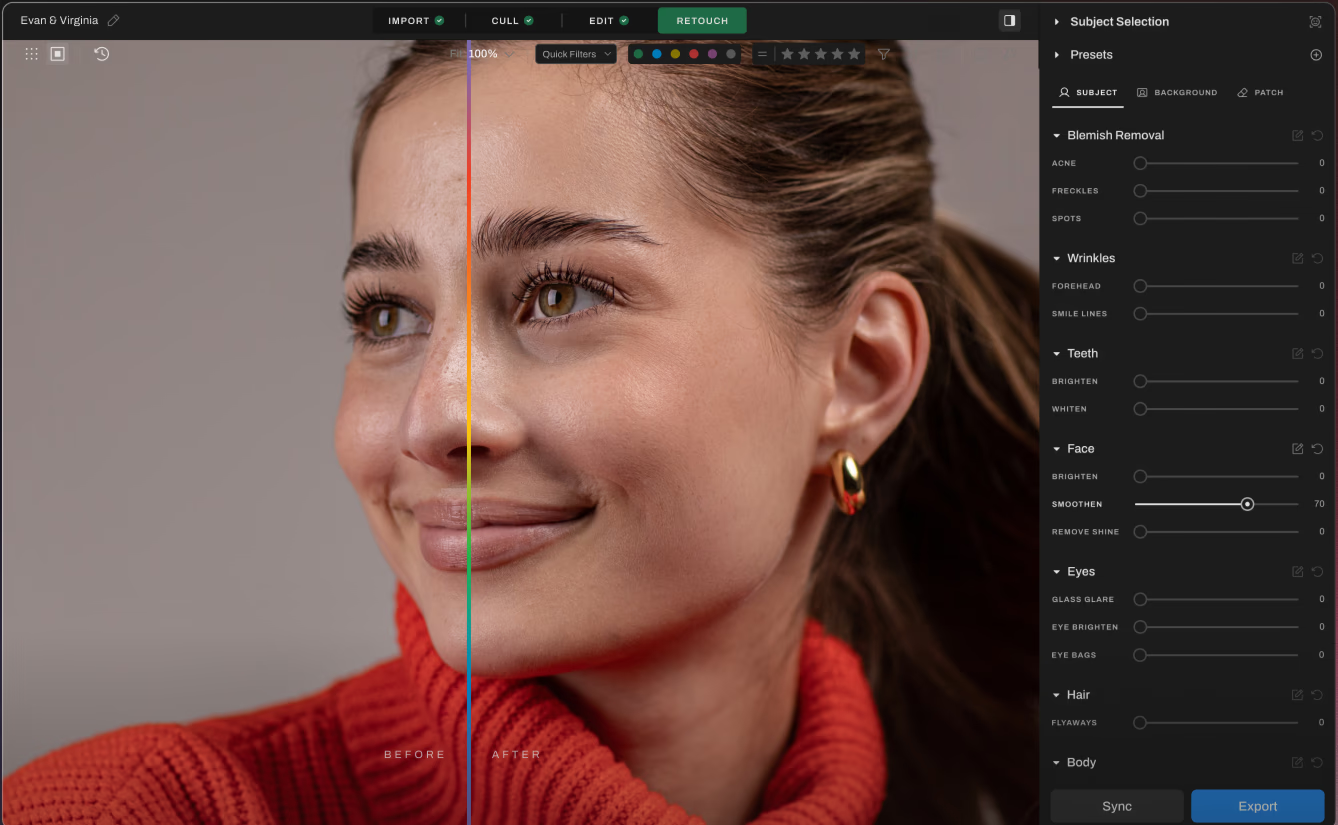
Aftershoot has earned a strong reputation because it was built by working photographers, for working photographers. A few practical reasons it shows up in so many wedding and portrait pipelines:
- Runs locally on your machine — no cloud uploads, no waiting for slow networks.
- Flat-fee pricing instead of per-gallery or per-image charges.
- Fast, intuitive culling that flags rejects, suggests keepers, and lets you review before finalizing.
- Style-aware editing that applies a consistent base look across mixed lighting and gear.
- Light retouching for skin, eyes, glasses glare, and stray hairs — useful on portrait-heavy shoots.
- Slots into Lightroom or Capture One so you don't have to abandon a workflow you already trust.
For wedding photographers especially, the combination of "Aftershoot for cull and base edits, Lightroom for the final creative pass" has become a near-standard setup.
Real Results from Real Photographers
Working pros who've rolled AI into their workflow consistently say the same thing: it's not about cutting corners, it's about staying sane during peak season.
- One wedding photographer reported turning an 8-hour cull into a 45-minute review session.
- Another now delivers full galleries in roughly half the time and says she actually enjoys editing again.
- Portrait studios have used AI retouching to cut weekly turnaround on headshot batches by more than half.
The pattern is consistent — AI doesn't replace talent, it amplifies it.
Practical Tips for Using AI Without Losing Your Edge
- Start with assisted modes, not full auto. Treat the AI's output as a suggestion, not a final answer.
- Always do a quick second pass. If a frame you love got rejected, mark it — most tools learn from corrections.
- Train the system on your best work, not your rushed work. The model copies whatever you feed it.
- Lock in your style by saving a profile or preset, so consistency carries across projects.
- Spot-check at 100% before delivery. AI is impressive, not infallible.
Common Mistakes to Avoid
- Letting AI choose every keeper without human review.
- Applying the same preset to every job regardless of light or mood.
- Forgetting to back up before running automated workflows.
- Trusting AI retouching on critical hero images without manual finishing.
Final Thoughts
AI is now part of professional photography whether you adopt it formally or not. The photographers getting the most out of it treat it as an assistant — one that handles culling, base edits, and routine retouching so they can spend their best hours on composition, storytelling, and client relationships. Automate the admin, streamline the bulk tasks, and reclaim your time. Just keep your hands firmly on the parts that define your style.
FAQ
Will AI culling miss shots I'd actually want? Sometimes, yes — especially intentional artistic frames like silhouettes or motion blur. That's why a quick review is essential. Most tools learn from your corrections over time.
Can AI editing match my personal style? Modern tools train on your existing work to mimic exposure, white balance, contrast, and tone choices. Results are strongest when you train them on a large, consistent body of edited images.
Is AI retouching good enough for client delivery? For weddings, portraits, family sessions, and corporate headshots, it's usually more than enough. For high-end beauty or commercial campaigns, you'll still want a manual finishing pass.
Do I need to abandon Lightroom or Capture One? No. Tools like Aftershoot and Imagen are designed to plug into existing catalogs. Most photographers use AI for culling and base edits, then refine inside Lightroom.
Is AI going to replace photographers? Not for the work that requires vision and human connection. AI is replacing repetitive tasks, not the photographer. Those who learn to use it well will simply deliver faster, with more energy left for the creative work that matters.